I've improved the adapter I created to pair the Kenwood TH-D74/TH-D75 radios with iPhones and iPads over Bluetooth.
Meet B.B. Link – your solution to connection blues. It lets you use the radio's KISS TNC with RadioMail and APRS.fi and can even control the radio frequency and mode!
Ken, yes, it is the correct one. My guess is that they listed "Bluetooth BLE 4.2" as a shorthand to mean "The original Bluetooth Classic, the one your mom warned you about, and BLE 4.2".
If you scroll down a little on their store page, the comparison matrix shows that the TinyPICO uses the ESP32-PICO-D4 MCU which has BT Classic & BLE 4.2 support.
Very nice. Thank you for all that you’ve done for the Bluetooth shortcomings on the D74/D75 and Winlink on iOS!!
I got my TinyPICO updated with BBLink with no issues this morning.
The case printed great, too.
I’ve ordered the battery from AliExpress; maybe it will be here before summer.
I flashed my original version to the new sketch and all is peachy-keen. The ability to move a VHF radio to the desired mode and frequency, and restore to original settings is unprecedented. Battery ordered and STL downloaded. I have been running the bridge on a 5v usb power bank shrink-wrapped to the board! The case with on/off switch will be very convenient.
The chip type doesn't affect the adapter's function. It helps your computer recognize and talk to the board over USB, which is needed just for firmware updates. After you unplug the USB, this chip isn't used.
The CH9102F is highlighted because it needs extra drivers for your computer to detect it. It's a cheaper option than the CP2104, making it a good choice despite the extra setup step.
My ESP32 version has the CP2104 (USB-B). I had it working with the first
implementation of BT Classic to BLE.
I have installed the drivers from the SiLabs site, but when I go into
Arduino IDE, my only com port selections for the board are COM8 and COM10
which both show as Bluetooth serial ports. I have tried each one and both
error out on the upload.
Sketch uses 1175769 bytes (89%) of program storage space. Maximum is
1310720 bytes.
Global variables use 40752 bytes (12%) of dynamic memory, leaving 286928
bytes for local variables. Maximum is 327680 bytes.
esptool.py v4.5.1MitchSerial port COM10
Connecting...
A serial exception error occurred: Write timeout
Note: This error originates from pySerial. It is likely not a problem with
esptool, but with the hardware connection or drivers.
For troubleshooting steps visit: https://docs.espressif.com/projects/esptool/en/latest/troubleshooting.html
Failed uploading: uploading error: exit status 1
COM8 doesn't get that far.
Any tips on how to get the drivers installed correctly and the board's
serial ports recognized?
I’m seeing one problem with using APRS.fi and Radiomail.
Radiomail works.
APRS.fi works.
B.B. Link will not hold the BLE connection after using APRS.fi. I have had to reboot the iPhone, re-link in B.B. Link then use Radiomail to get the connection to hold. If I use APRS.fi, the BLE connection goes bad again.
Mitch, from my experience there can only be one client connected via BLE, so if APRS.fi is running, RadioMail or The B.B. Link Configurator may not connect.
Make sure to fully quit the app or disconnect explicitly and see if that makes a difference. If you're still running into problems, please open an issue at GitHub · Where software is built
OTA updates are now available with the new firmware version 0.7.2. Once you upgrade to this version, the B.B. Link Configurator 1.0.1 will allow you to flash all future updates wirelessly.
I updated everything just now and it was an easy process. Now running
configurator 1.01 (2) and B.B. Link firmware 0.72. I assume that the
configurator checks for new firmware versions automatically and will show a
new one if it exists?
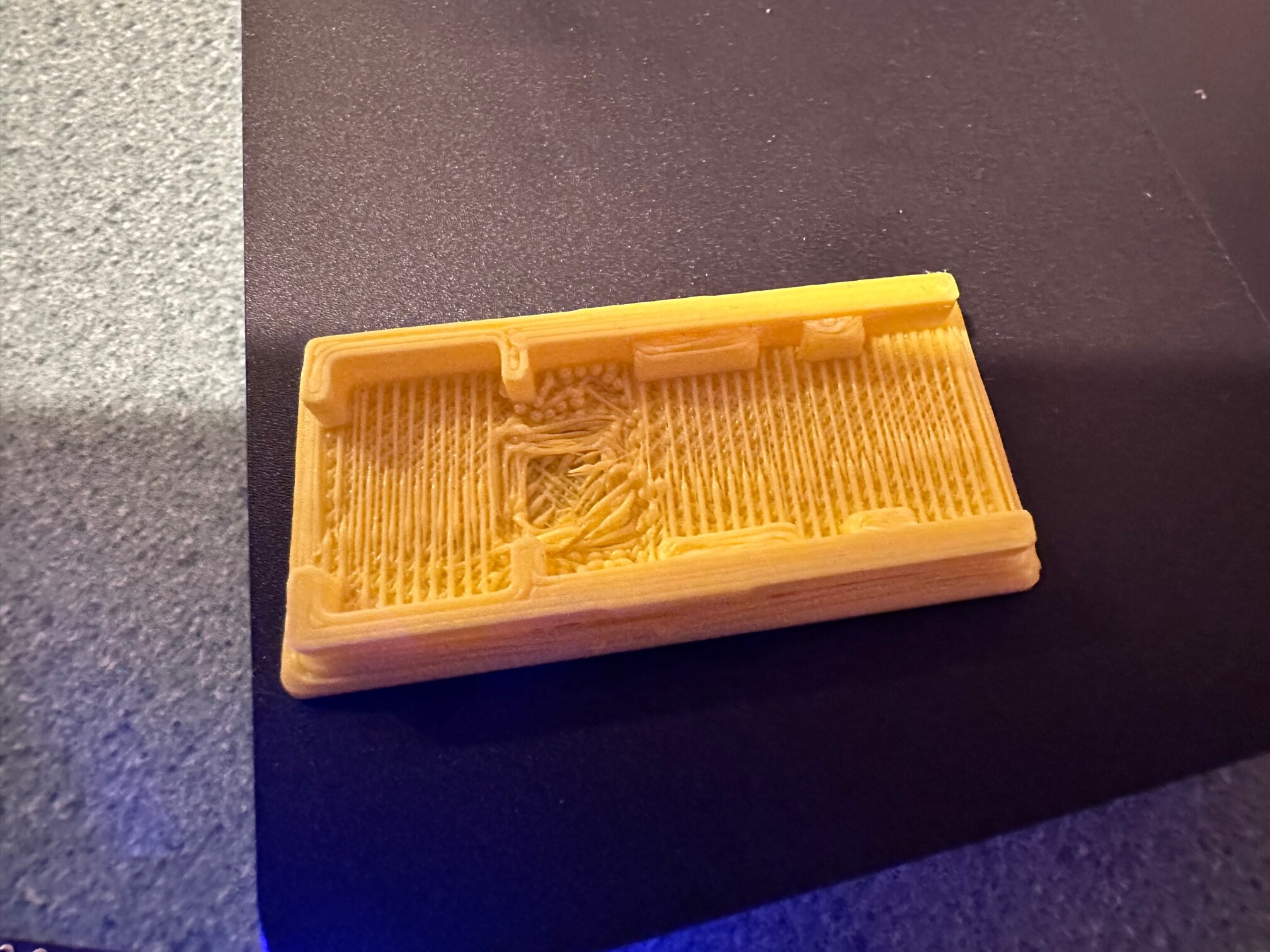
About the time I got Georges' email, my friend with the 3D printer showed
up with the enclosure he printed for me. For some reason he chose yellow
filament. (!) He had issues with the lid and wondered why it printed
the way it did. The underside had no support and the filament tended to
string as shown here. It printed with the underside down on the table. He
is going to try again with a black or gray filament and see if he can
rearrange the printing order in the slicer so the outside of the lid is on
the table instead of the underside.
Yes, B.B. Link Configurator will check for newer firmware when you connect to the adapter and the Update Firmware button will be enabled if one is found.
Not gonna lie, that print looks like a pile of spaghetti. Yes the lid needs to be printed "upside down". There is probably a settings when I export the file that would orient it correctly, but like I said in the video, when it comes to 3D printing I'm a total neewb. Bits over atoms anytime